Ever stared at a tangle of cables or a messy network diagram and thought, “There has to be a better way”? That’s where the extended star topology comes in: a structured, scalable network design that keeps communication smooth, devices organized, and troubleshooting a breeze.
In this guide, we’ll break down what an extended star topology is, show exactly how an extended star network works, explore real-world use cases, and highlight the key advantages and disadvantages.
What Is an Extended Star Topology?
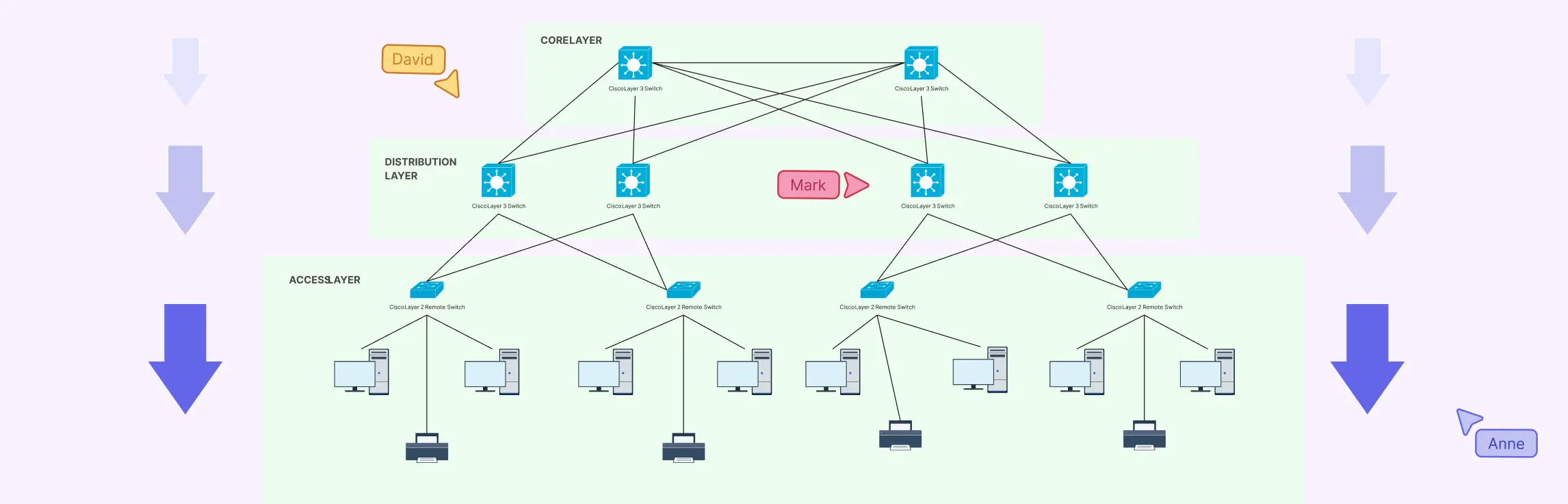
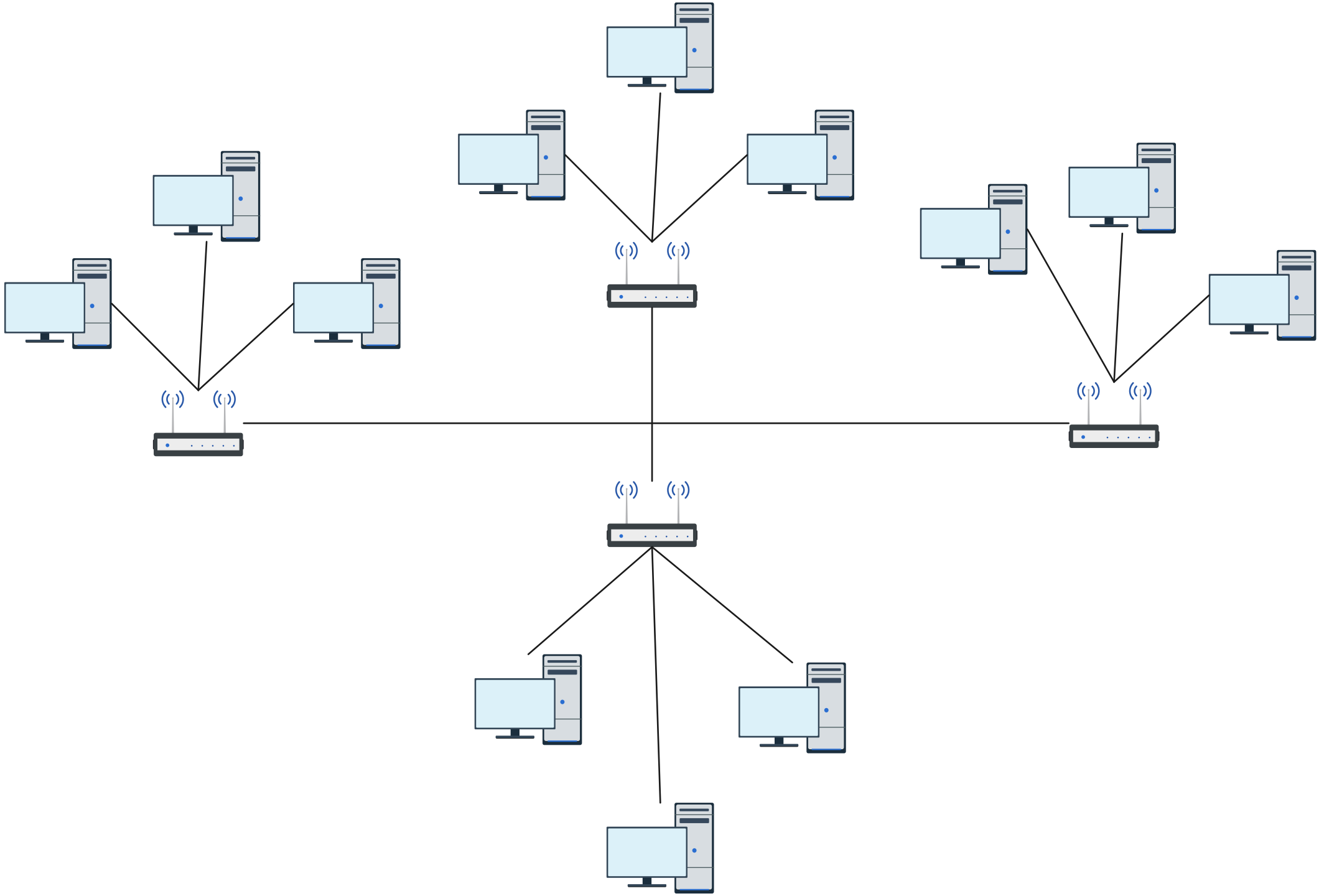
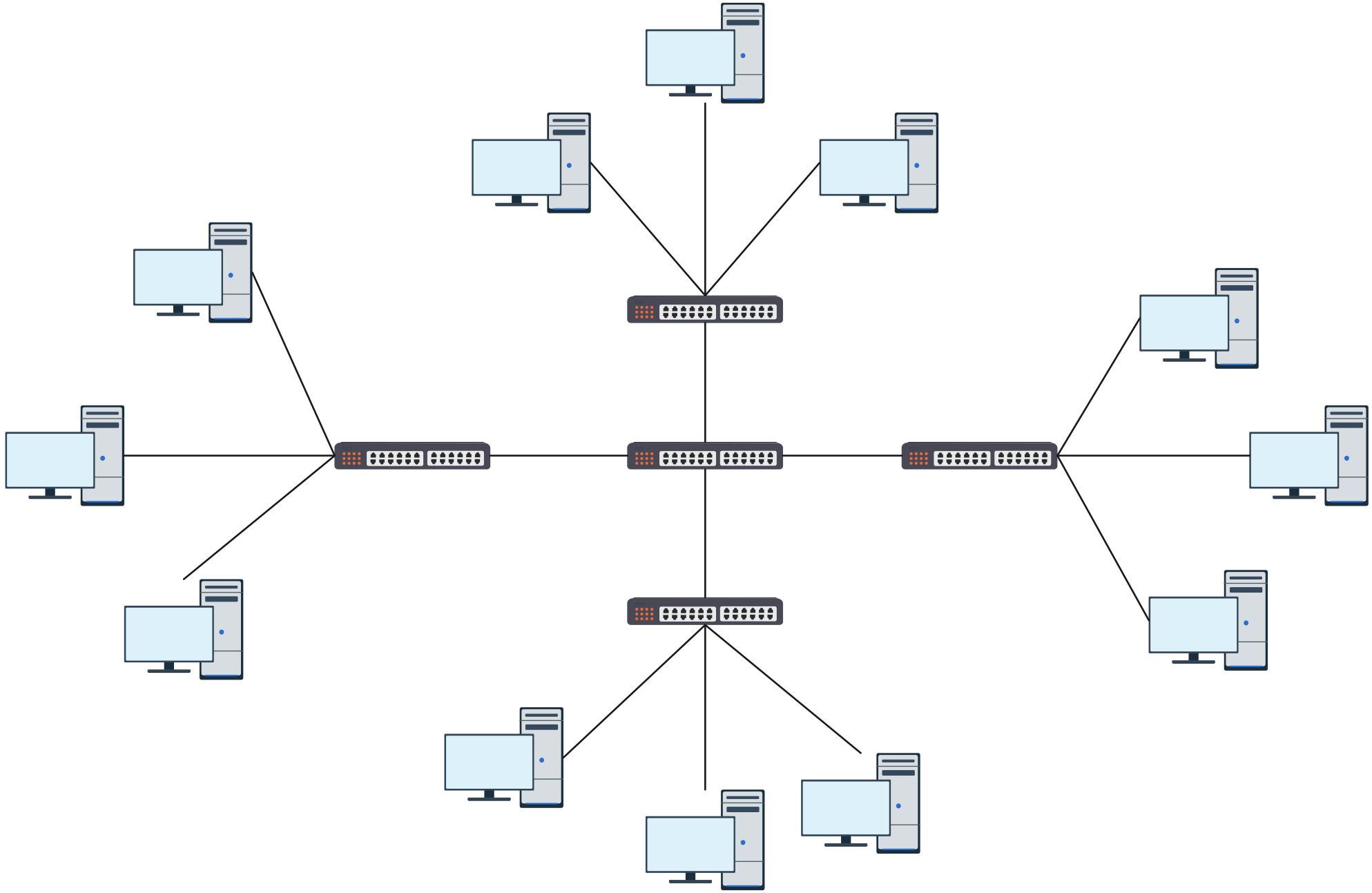
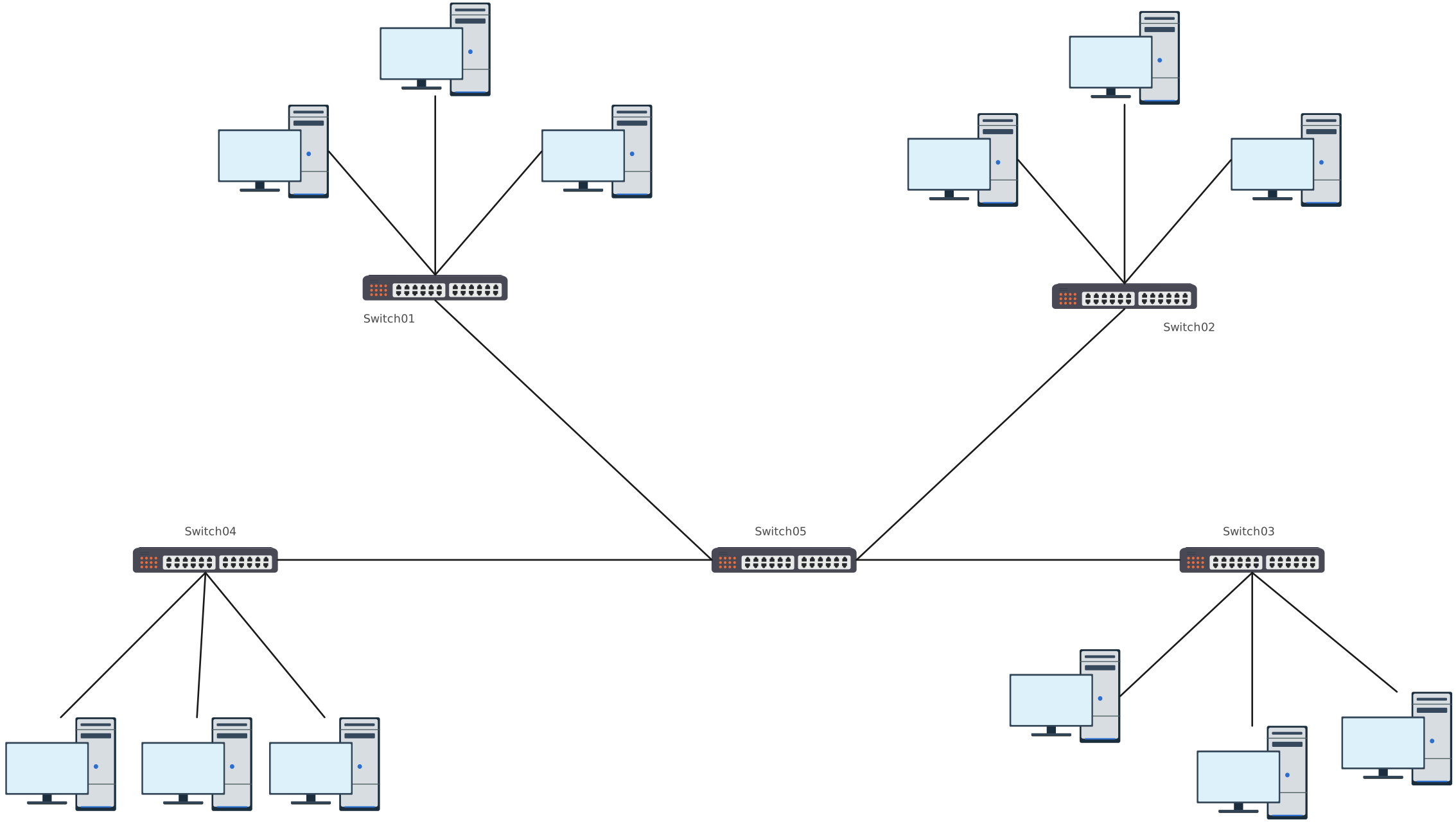
An Extended Star Topology is a type of network structure where multiple star networks are connected together through a central hub or switch. Think of it as a “star of stars”, each individual star network radiates from its own central point, and all these hubs connect to a higher-level central node. This setup allows the network to cover more devices and expand without losing the simplicity and manageability of a regular star network.
In a standard star topology, all devices connect to a single central hub or switch. While this is simple and easy to manage for small networks, it can become limiting as the network grows. The extended star topology solves this by linking multiple star networks together, creating a scalable and more resilient system that’s ideal for larger organizations or campus networks.
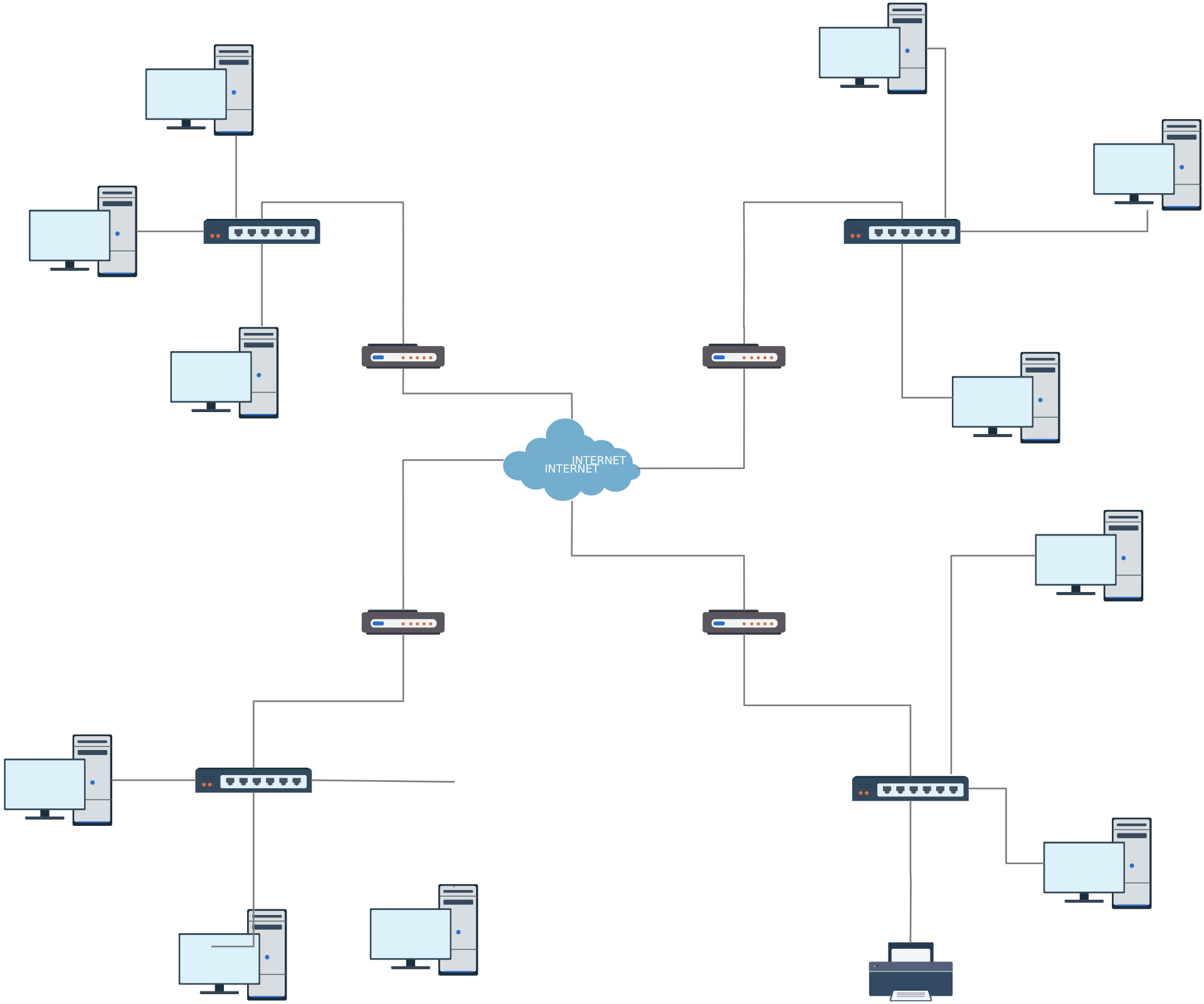

Essentially, it’s like moving from a single classroom setup to an entire school: each classroom has its own hub, but the school principal (central hub) oversees and connects all of them. This structure keeps communication organized, reduces congestion, and allows for easier troubleshooting compared to sprawling networks with no hierarchy.
How an Extended Star Network Works
Understanding how an extended star network works is easier when you break it down step by step. Imagine multiple star networks, each with its own hub, connected to a central hub at the top. Here’s how data flows through this structure:
Device sends a request – Each device (like a computer or printer) sends data to its local hub or switch within its star network.
Local hub processes the data – The hub determines whether the data is for another device in the same star network or needs to go beyond.
Data reaches the central hub – If the destination device is in a different star network, the local hub forwards the data to the central hub.
Central hub routes the data – The central hub acts as the backbone, directing the data to the correct secondary hub.
Destination hub delivers the data – The secondary hub receives the data and sends it to the intended device within its star network.
This hierarchical setup ensures that communication remains organized, efficient, and scalable. Unlike a single-star network, where every device relies on one hub, an extended star network spreads the load, reducing congestion and improving reliability.
Extended Star Topology Use Cases
An extended star topology is more than just a theoretical network layout. It’s a practical solution for businesses and IT setups that need scalable, reliable, and organized networks. Here’s where this topology shines:
1. Corporate LAN Using Extended Star Topology
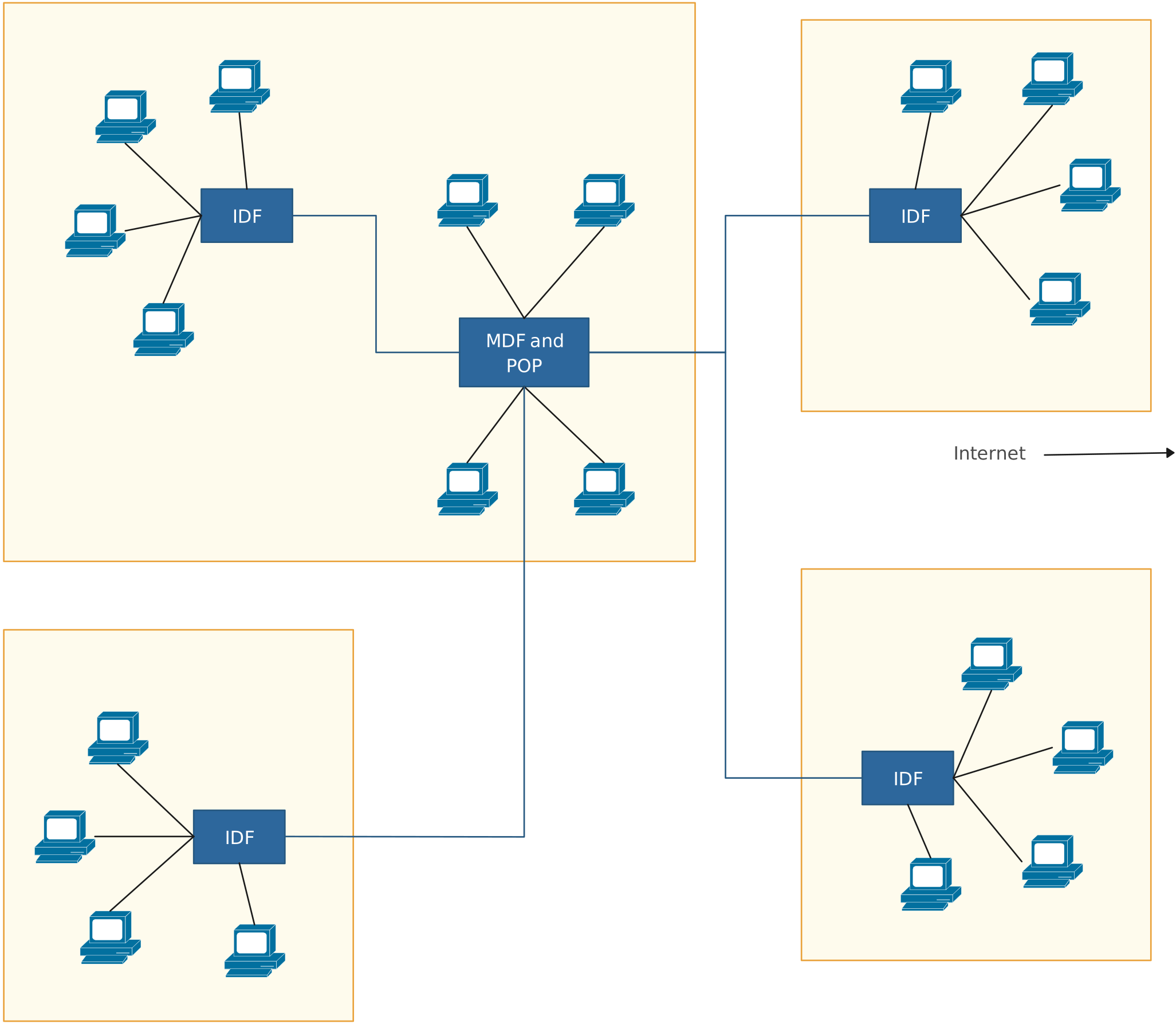
In large offices or corporate campuses, managing hundreds of devices on a single hub can quickly become chaotic. By implementing an extended star network, each department or floor can have its own local hub connected to a central hub. This design ensures smooth communication between teams, reduces congestion, and enhances overall network efficiency.
2. Campus Networks with Extended Star Topology
Universities, schools, and multi-building campuses benefit from the extended star topology by connecting individual buildings as separate star networks, all linked to a central hub. This setup makes enterprise network design simpler, provides centralized management, and allows IT administrators to troubleshoot issues without affecting the entire network.
3. High-Traffic Environments Using Extended Star Network
Data centers, call centers, or any high-traffic IT environment can use an extended star network to prevent bottlenecks. Local hubs handle internal traffic while the central hub efficiently routes cross-network communication. This ensures that performance remains high and downtime is minimized, which is essential for mission-critical operations.
4. Hybrid Business Networks with Extended Star Topology
Companies with multiple branches or remote offices can use an extended star topology to connect each branch as a separate star network. The central hub (or cloud-based central node) links all branches, allowing seamless collaboration, secure data transfer, and easy network monitoring.
Extended Star Topology Advantages and Disadvantages
Here’s a clear breakdown of the advantages of extended star topology and its potential drawbacks. This table highlights why many organizations choose this setup, as well as what to watch out for:
| Aspect | Advantages | Disadvantages | Real-World Impact / Relatable Example |
| Reliability | Centralized hubs allow easy monitoring and troubleshooting. | High dependency on central hubs means a hub failure can disrupt multiple connected networks. | If a department’s hub goes down, that team can’t access shared resources, causing workflow delays. |
| Scalability | Easy to expand by adding new hubs or devices without redesigning the entire network. | Expansion requires additional hardware and careful planning. | Growing companies can add floors or departments easily, but budgets must account for extra switches and cabling. |
| Centralized Management | All star networks connect to a central hub, simplifying control and maintenance. | Complexity increases with more hubs; central hub becomes a critical point. | IT admins can monitor traffic from a single dashboard, but any misconfiguration at the central hub can affect multiple teams. |
| Performance | Reduces network congestion compared to a single star, improving data flow. | More hardware and cabling needed than a basic star network. | Teams experience smoother communication and faster data transfers, unlike messy ad-hoc networks that slow down during peak hours. |
| Fault Isolation | Issues in one star network rarely affect others. | Localized hub failure affects only that segment, but backup strategies are needed. | If one office floor has a problem, it doesn’t take down the entire corporate network, but you still need contingency plans. |
An extended star topology isn’t just a technical diagram. It’s a practical, scalable solution for modern networks. From enhancing reliability and performance to simplifying centralized management, it addresses many of the frustrations that come with messy or overloaded network setups. By understanding how an extended star network works and where it’s best applied, you can design networks that are not only efficient but also easier to manage and expand.
Ready to bring clarity to your network planning? With Creately, you can quickly create extended star topology network diagrams, customize templates to your setup, and visualize complex networks with ease, turning frustration into a workflow that just works.
Helpful Resources
Learn how to draw a network diagram step by step, from planning what to include to laying out components clearly and choosing the right symbols.
Discover key bus topology diagram elements, highlight common design patterns, and point out the limitations you need to account for when working with this topology.
Understand how to approach Cisco network topology diagrams with confidence and create visuals that are practical, accurate, and easy to understand.
Learn how to create a home network setup diagram step by step, understand common layouts, follow practical best practices, and use free templates to map your setup.
Discover how to create a wide area network diagram step by step, understand key components, WAN examples, and follow proven best practices.
Explore what hybrid topology diagrams are, the hybrid types & examples, highlight advantages and disadvantages, provide a step-by-step creation process, and best practices.
Everything you need to know about LANs, from the basics and key components to network types, advantages, and best practices.